
Check expenses against the policy automatically
You upload your expense policy as a PDF. The AI reads rules, limits and exceptions and checks every submission instantly. Managers receive a reasoned recommendation.
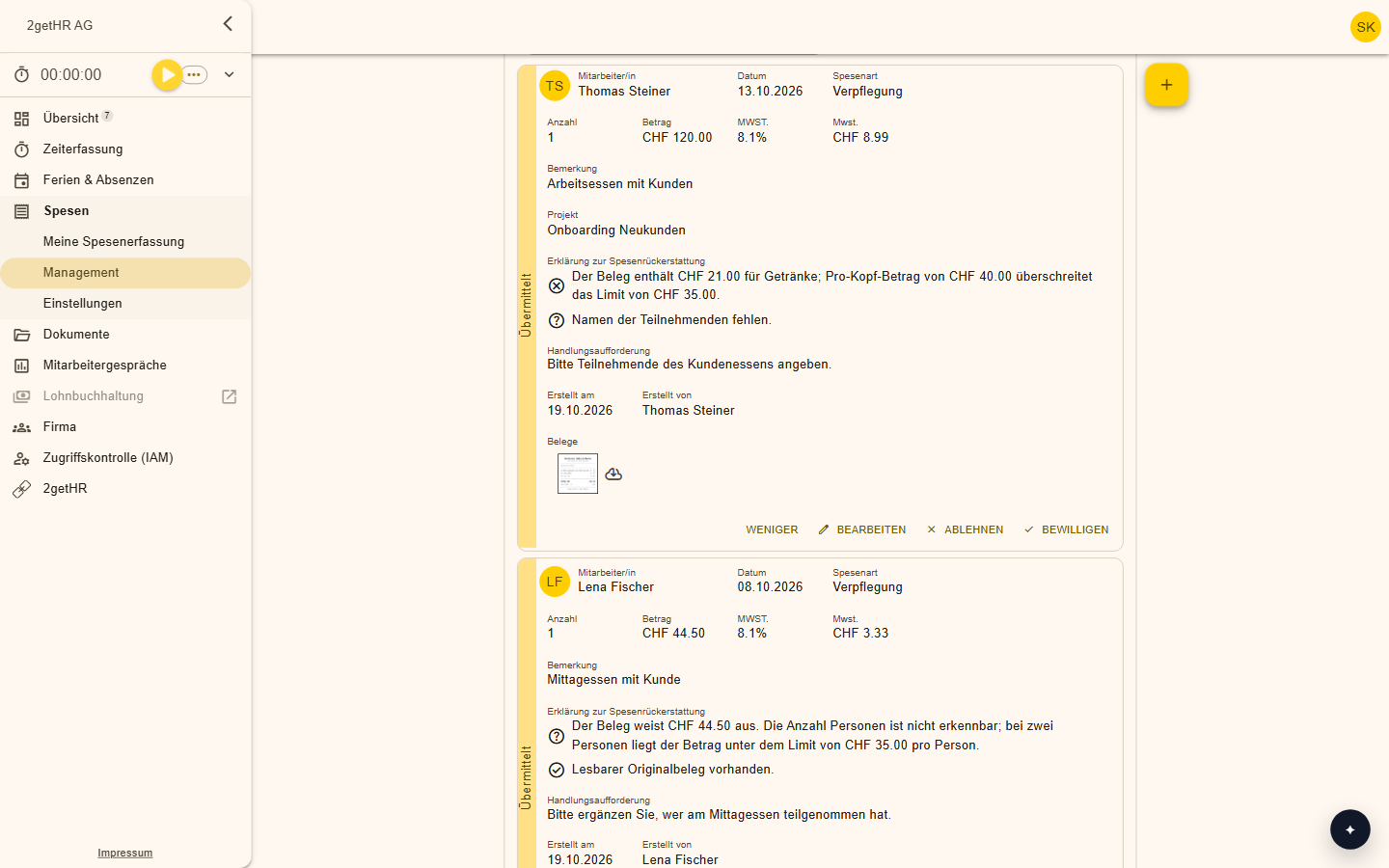
Features at a glance
Checked instantly
Every submission is checked against the policy the moment it arrives.
Deviations visible
Errors and deviations are detected and clearly flagged.
Recommendation
Managers receive notes on deviations, risks and next steps.
Customisable
You fine-tune the detected policy by hand, for example which rules apply to which wage types.
How it works day to day
Upload the policy
Upload your expense policy as a PDF.
Read the policy
The AI identifies rules, limits and exceptions.
Fine-tune
Adjust the rules if needed.
Check automatically
From now on, every submission is checked instantly.
Fast approvals, clear processes
There are fewer follow-up questions, and the policy is always applied the same way, regardless of who submits or from which location.
Frequently asked questions
Which files can I upload?
Your expense policy as a PDF.
Does the AI decide on approval?
No. It provides a reasoned recommendation; approval stays with managers.
Make your team's everyday work easier
Try 2getHR free for 30 days. We're happy to help you get started, in the webinar or in training.